

Tracking Free Trial Users and Conversions
How to monitor active free trials, trial conversion rates, and expired trials using Putler's subscription analytics.
Currently, Putler doesn’t have a built-in “trial” KPI. However, you can track free trial users using a simple workaround by creating a custom filter.
Here are the steps to track free trials:
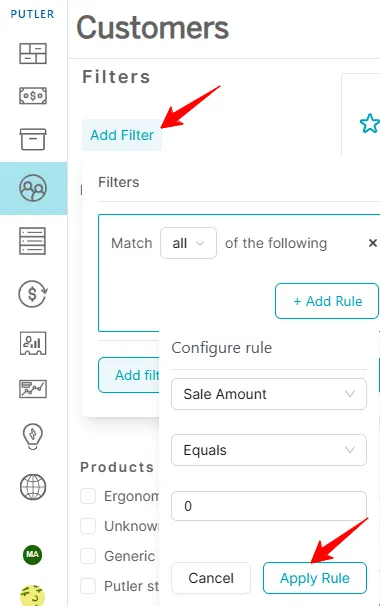
- Go to the Customers dashboard in Putler.
- Click “Add Filters” on the left-hand side.
- Select “Add Rule”: In the first dropdown, choose “Sale Amount”, Select the operator “Equals”, Enter the value 0.
- Click “Apply Rule.”
- Save this filter Save as Segment for quick access in the future.
:::
Got a minute? Watch this video to see how it’s done.